
RenamerX
RenamerX uses AI to suggest filenames from file content and reusable naming templates. You can review and edit suggestions before renaming a batch, then undo applied renames.
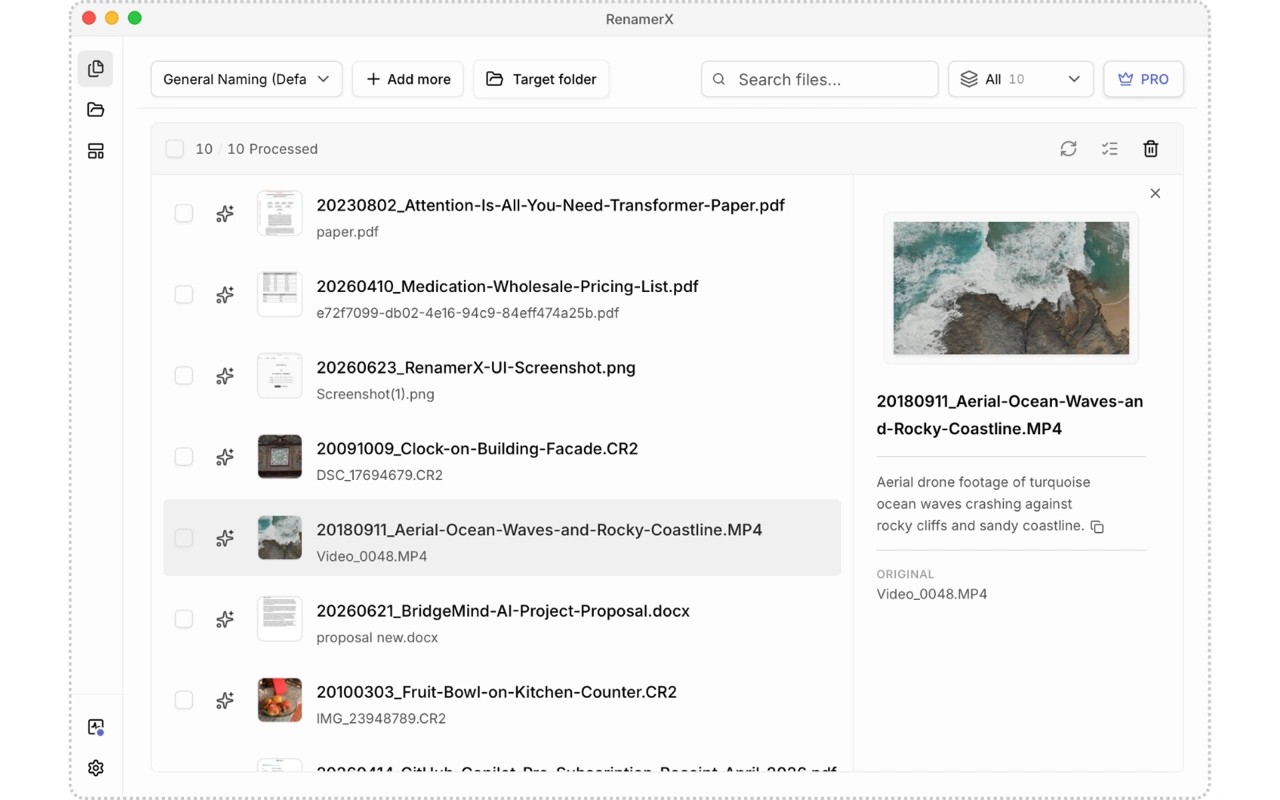
RenamerX renames documents, images, and videos based on their contents. Reusable templates define which details to extract, such as dates, client names, or amounts, and how to arrange them in each filename.
You can drop files or folders into the app, generate suggested names, and edit individual results before applying changes in bulk. Applied renames can be undone. The same workflow can also place files into folders by subject, type, or project. Watch Folders monitors incoming files and waits for file activity to settle before processing them.
Built-in local AI processes file content on your Mac and requires Apple silicon. Setup downloads about 3.4 GB of model files and checks compatibility. Alternatively, RenamerX can connect to Ollama, LM Studio, OpenAI, Google Gemini, or a compatible custom endpoint. Processing location depends on the provider you choose.
Tags
More in Utilities

NZB Drop
Utilities
TopNotch
Utilities