Balanced
Balanced converts bank statements, seller reports, invoices and receipts into spreadsheets and accounting import files. It processes documents on your Mac and checks transaction balances and totals so you can review discrepancies before exporting.
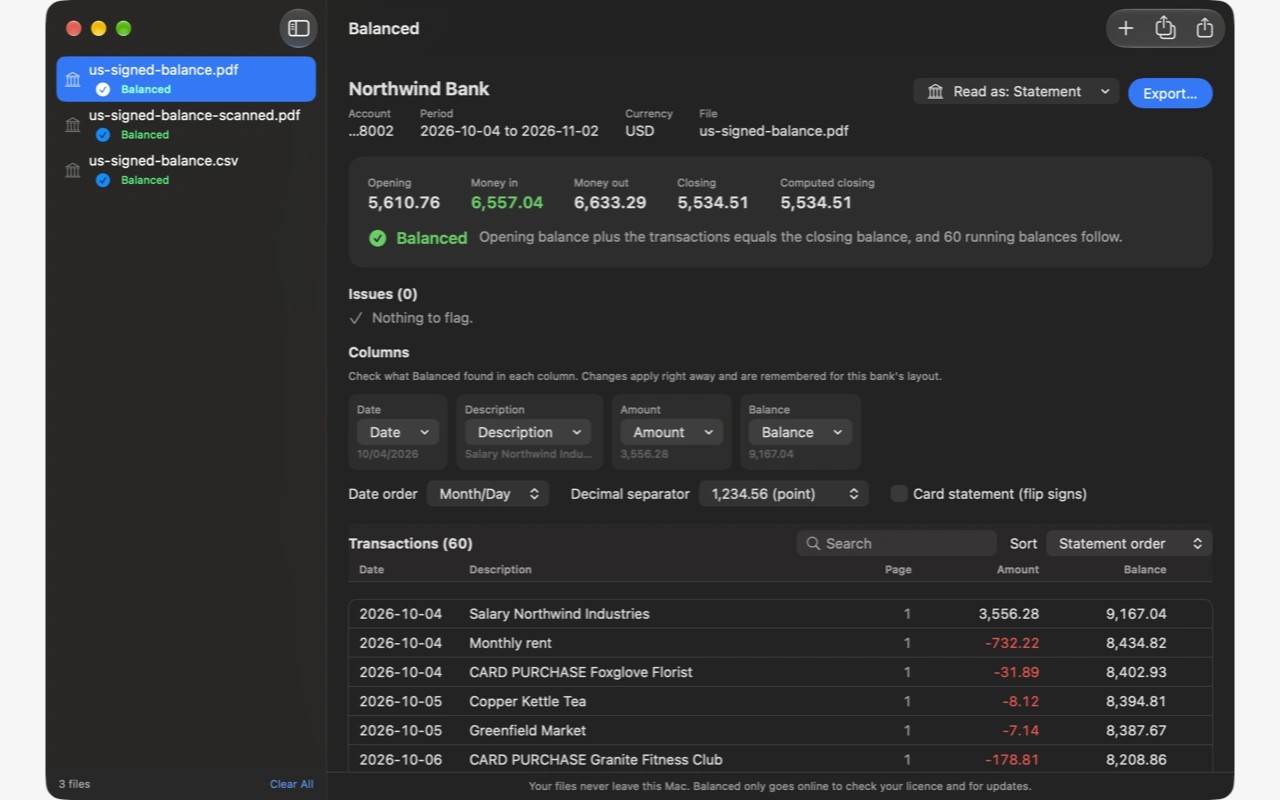
Balanced converts bank and card statements, marketplace seller reports, invoices and receipts into files for spreadsheets and accounting software. Open a document, review the extracted table, then export to formats such as CSV, Excel, Quicken, QuickBooks or Xero. Available formats depend on the document type.
The app checks the extracted numbers using arithmetic. For statements, it compares the opening balance plus transactions with the closing balance and checks running balances when present. Seller reports and invoices have their own checks, such as matching payouts to their lines or invoice line items to the total. Discrepancies show the difference and the rows involved; exporting with a failed check requires confirmation.
You can correct column roles, date order and debit or credit signs in the preview. Balanced remembers statement corrections as saved bank layouts. Seller report categories can also be changed and remembered for later reports, and monthly reports from the same platform can be combined into one export.
Text PDFs, scanned PDFs and images are supported, along with CSV, TSV and text seller reports. Scans use Apple's on-device text recognition, while extraction and categorisation use fixed rules rather than AI models. Documents stay on your Mac; internet access is used only for licence checks and updates, with no account or analytics.
Balanced recognises headings and month names in ten languages, but does not guarantee support for every bank layout. Very skewed or low-quality scans may be unreadable, and password-protected PDFs must be unlocked first. The preview lets you check the extracted table before export.
