
Super Notch
Super Notch brings Claude Code, Codex, and Cursor sessions into the Mac notch so you can find a project and resume its conversation. It also offers English dictation into the focused field and a voice assistant with an optional floating window.
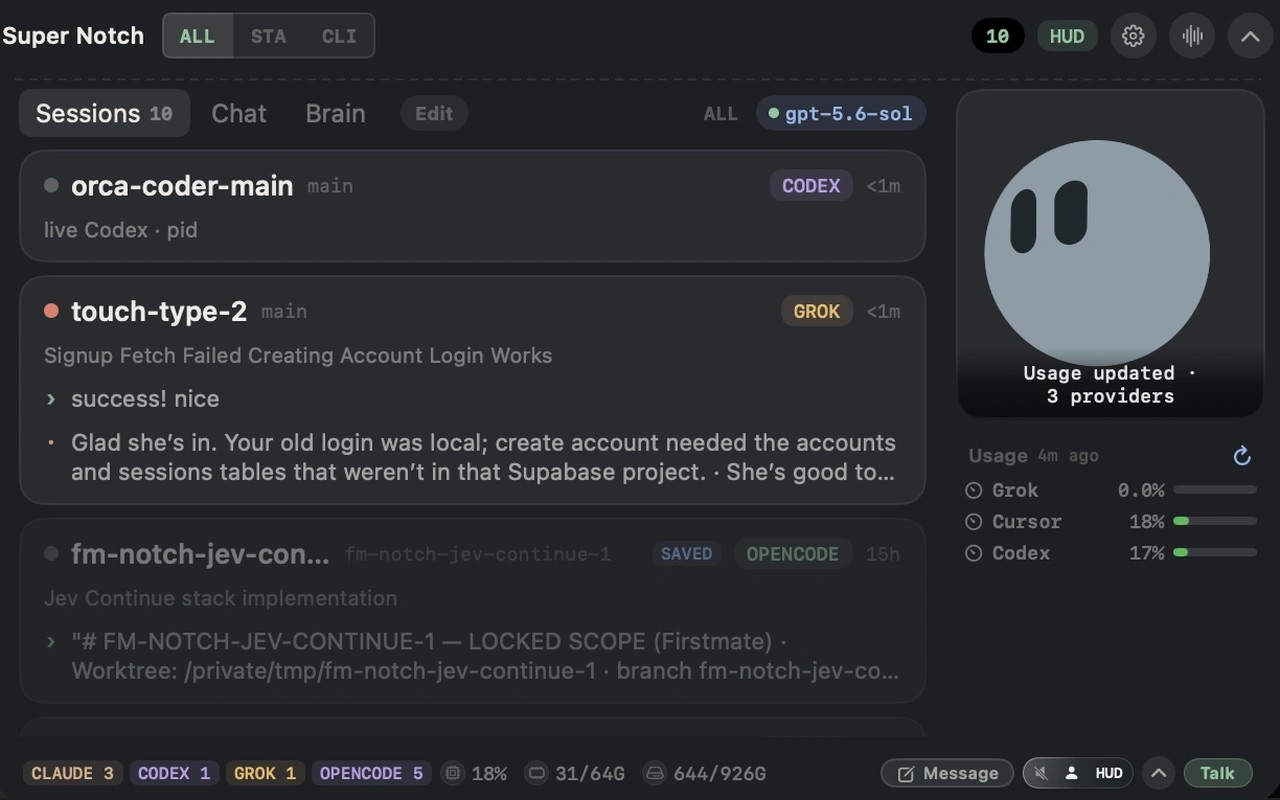
Super Notch helps you find and resume AI coding sessions across Claude Code, Codex, and Cursor, including Cursor cloud agents. Session cards in the Mac notch show the project and recent activity, with a way back to the existing conversation. It works alongside your coding tools rather than replacing them.
Activity indicators help you keep track of supported sessions without switching apps. A finishing animation means a session is no longer detected as working; it does not confirm that the task succeeded, and stale or disappearing sessions can also trigger it. You can also check connected providers’ usage limits alongside CPU, memory, and disk information. Available usage details and their freshness vary by provider.
Hold Right Option to dictate English into the focused text field, then review and send the words yourself. The default Phonon 2 speech engine runs locally after a model and runtime download. Other recognition engines are available, including cloud options, so processing depends on the engine selected. Voice features require microphone and accessibility permissions.
Hold Right Command to speak with the assistant, or use a floating conversation window to ask about the app or webpage beneath it. Access to that content depends on app support and permissions. Talk sends the transcript to the selected AI provider; Grok, OpenAI, and Apple Intelligence on supported Macs are available for answers.
Super Notch requires an Apple silicon Mac.
Tags
More in Developer Tools

Tuple
Developer Tools
Push Hero
Developer Tools