
Reel
Reel saves copied text, links, images and files in a searchable clipboard history. A keyboard-controlled panel lets you preview clips, organize favorites into pinboards and paste back into the app you were using.
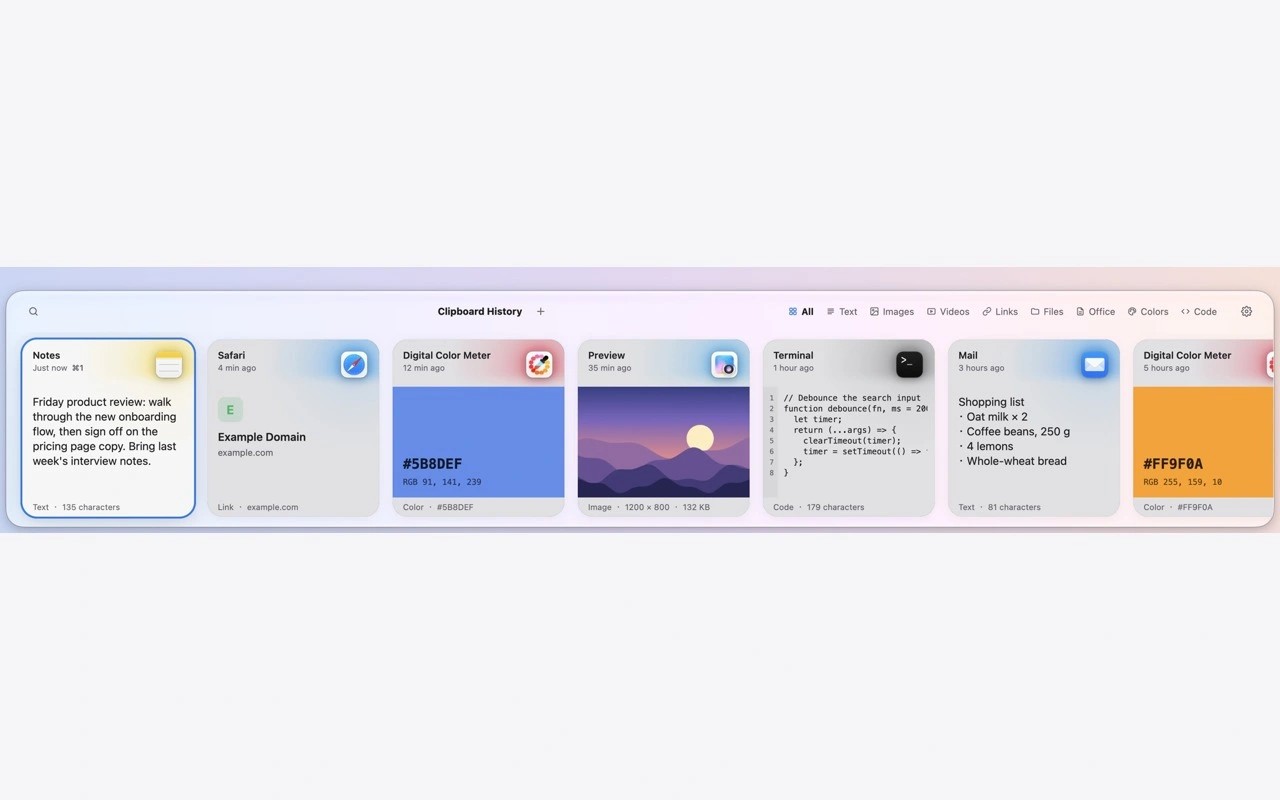
Reel is a clipboard manager that automatically saves copied text, rich text, code, links, colors, images and files. Duplicate copies are kept only once, and your history is stored on your Mac.
Press Shift-Command-V to open a panel at the bottom of the screen, use the arrow keys to select a clip, and press Return to paste it into the app you were using. Shift-Return pastes as plain text. Direct pasting requires Accessibility permission. Reel normally appears in the menu bar rather than the Dock.
Type in the panel to search your history, or narrow results by content type and file extension. Advanced searches support AND, OR, NOT and wildcards. Color-coded pinboards keep frequently reused clips together. You can also preview clips, edit text before saving or pasting, zoom into images, and switch between rendered Markdown and its source.
Settings let you choose how long history is kept and which apps are ignored. Reel also skips content that other apps mark as concealed or transient. Optional link previews fetch public web pages to show images and titles, so those sites can see that the links were visited. Local network addresses and links carrying secret parameters are excluded, and disabling previews deletes their existing cache.
Tags
More in Productivity

GyazMail
Productivity
BirthdayBook
Productivity