Mountain Duck
Mountain Duck brings server and cloud storage into Finder so you can open remote files in your usual apps. Files download on demand, selected folders can stay available offline, and changes upload in the background when a connection is available.
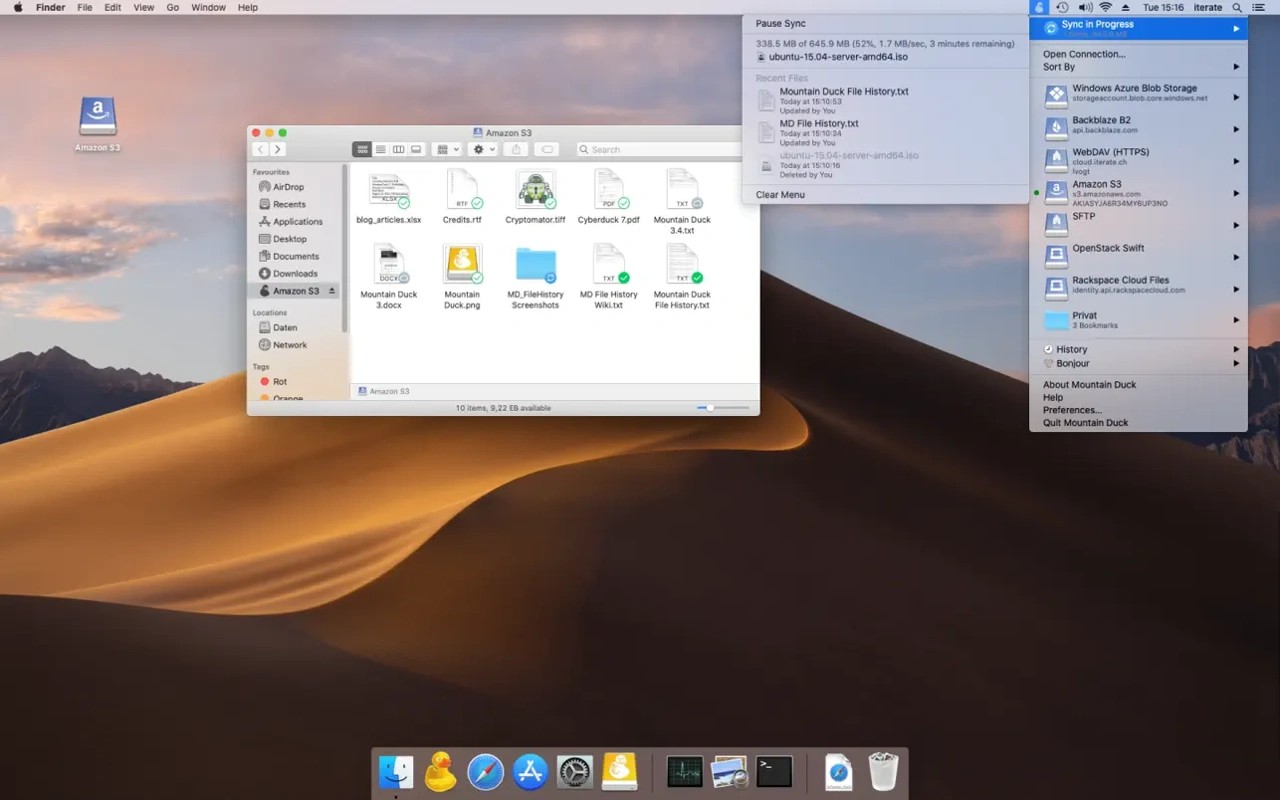
Mountain Duck mounts server and cloud storage in Finder, letting you open remote files with your usual applications and work with them like local files. It connects to storage you provide, including FTP, SFTP and WebDAV servers, Amazon S3, Google Drive, Dropbox and OneDrive.
You can browse remote files without downloading everything first. Files download and cache locally when opened, and you can select files or folders to keep available offline. Changes upload in the background when a connection is available, with status icons showing sync progress.
The menu bar interface provides connection management, sync progress and file history. Finder context menus give access to sync options and sharing. Supported services can create sharing links, including expiring links for services such as Amazon S3, OpenStack Swift, Microsoft Azure and Backblaze B2.
For shared documents, Mountain Duck supports file locking when opening files in Microsoft Office. It uses WebDAV server locks where supported, or lock owner files as an alternative. You can also open and restore earlier file versions in versioned Amazon S3 buckets. Cryptomator-compatible vaults provide client-side encryption for stored files.
Tags
More in Productivity

Alfred
Productivity
Muse
Productivity