
Make It a Video
Make It a Video records your screen, camera and voice for tutorials, demos and lessons. Edit recordings by deleting transcript words, review automatic cuts, and export the same recording in several shapes.
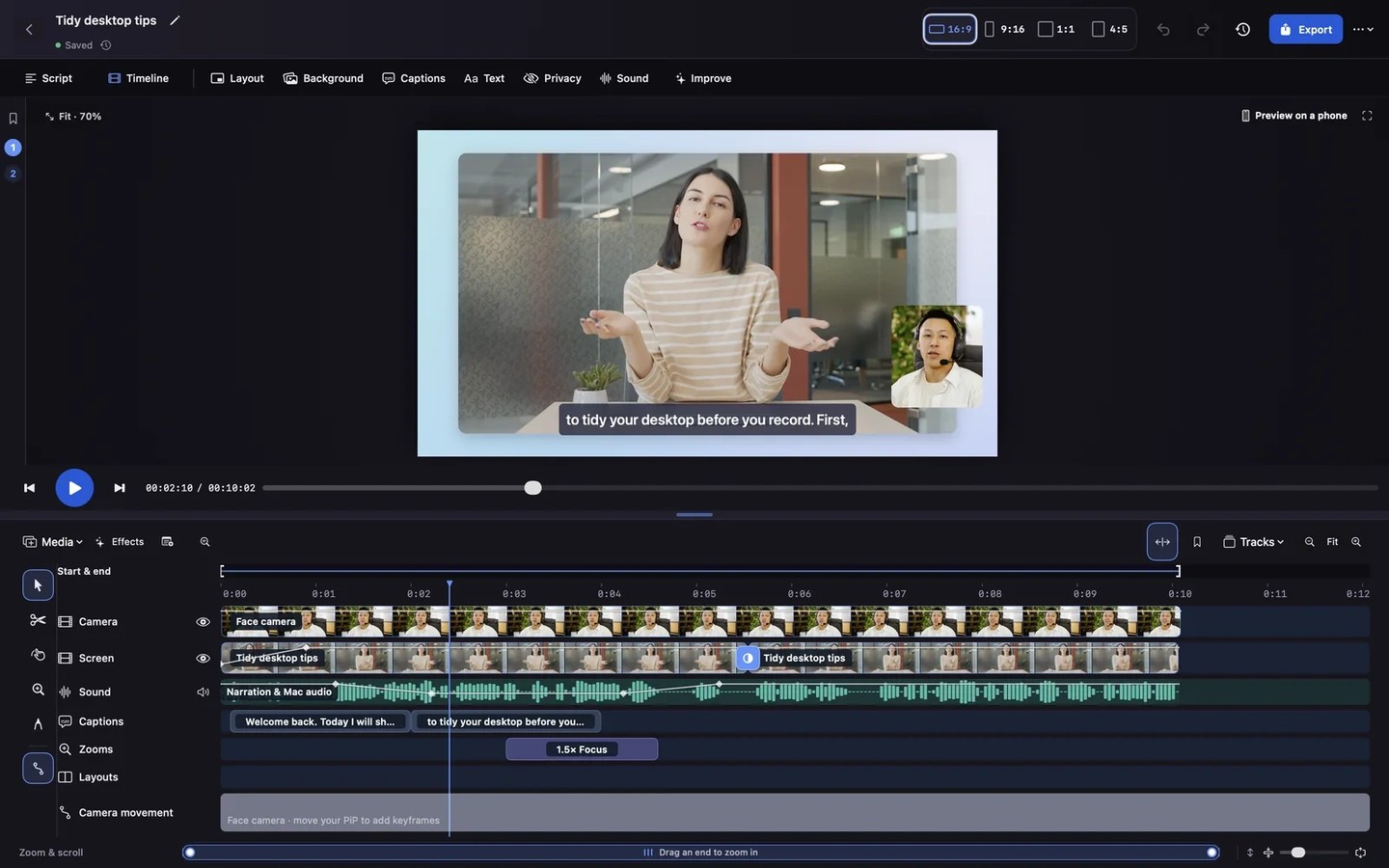
Make It a Video records your screen, camera and voice for tutorials, product demos and lessons. You can record your screen and camera together or import an existing video.
Speech appears as an editable transcript. Deleting words cuts the corresponding part of the video, while correcting a caption’s spelling leaves the footage unchanged. Automatic cleanup removes filler words, false starts, repeats and long pauses. You can review each cut and restore anything you want to keep.
The editor includes captions, backgrounds, camera layouts and zooms to highlight small details. You can also show clicks and key presses, add arrows and labels, and use a teleprompter that scrolls as you speak without appearing in the recording. Timeline tools provide additional control over clips, sound and transitions.
One recording can be exported as an MP4 in wide, vertical, square or portrait formats. Projects and recordings are saved on your Mac, and finished videos go to a folder you choose. Speech transcription and captions are processed on your Mac without uploading your audio.
An account is required when you first open the app. After signing in, you can record, edit and save offline for up to 14 days.
Tags
More in Photo & Video

PhotoShrinkr
Photo & Video
PanoVolo
Photo & Video