Swish
Swish manages windows with trackpad gestures, Magic Mouse input, and keyboard shortcuts. Swipe on a window’s title bar to snap it into a grid, or move windows between displays according to their physical arrangement.
Swish is a window manager built around trackpad gestures. You can swipe on a window’s title bar to snap it into position instead of dragging it to a screen edge. It supports 2×2, 3×2, and 3×3 grids, and you can drag a divider to resize multiple windows at once.
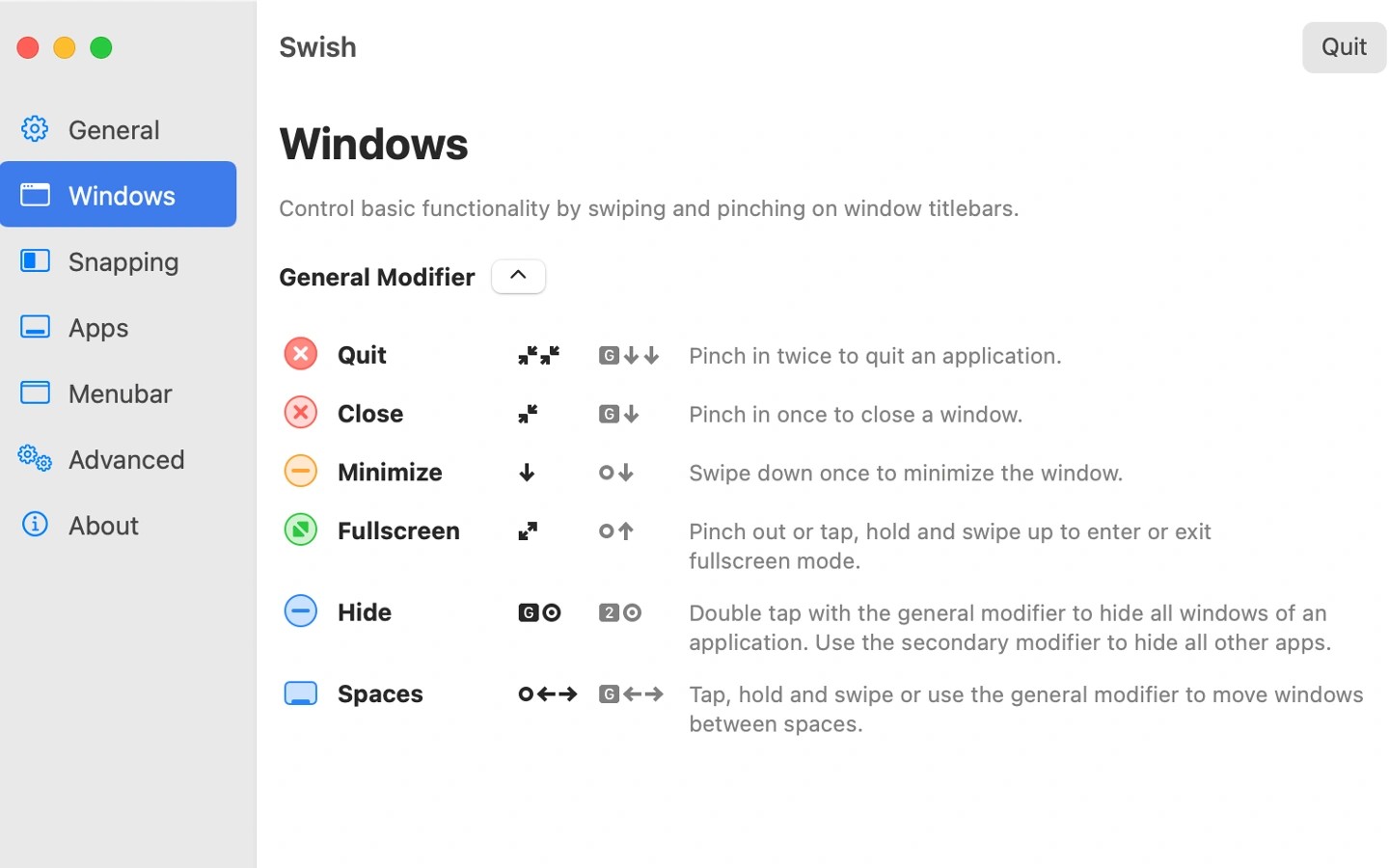
Gestures also handle common window actions: pinch in to close, swipe down to minimize, and pinch out to enter full screen. In a multi-display setup, swipes move windows between screens according to their physical arrangement. Individual gestures can be enabled or disabled in settings, which also includes explanations and a short tutorial.
Swish is primarily designed for the Magic Trackpad and also supports Magic Mouse. On Magic Mouse, swipes and double-taps combined with modifier keys provide access to most gestures. Keyboard shortcuts using Arrow, WASD, IJKL, or Dvorak keys cover snapping and moving windows between screens and Spaces.
Tags
More in Productivity

Oriloq
Productivity
Quicksilver
Productivity