
GeekLink
GeekLink turns burned-in captions or spoken audio into editable, timed subtitles and translates SRT files into 40+ languages. OCR and transcription run locally after model downloads; translation requires an internet connection.
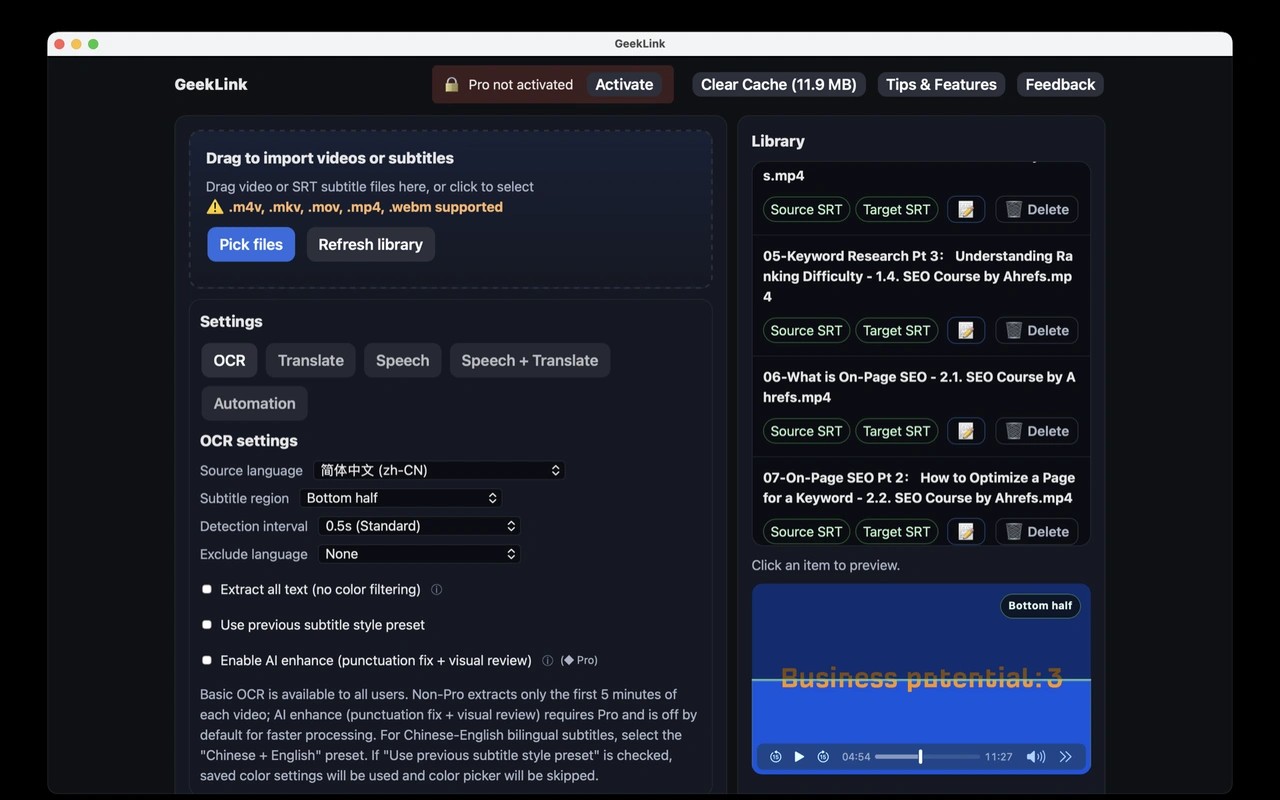
GeekLink creates editable subtitles from videos and translates existing subtitle files. It can recover captions burned into the video picture using OCR, or transcribe speech with Whisper-based recognition when no captions exist. Both workflows produce timed SRT files whose text and timing you can edit.
For OCR, the app detects likely subtitle rows for you to confirm, with manual selection boxes available for unusual layouts. This works without a separate subtitle file or usable audio. Speech transcription, by contrast, requires a usable spoken-audio track. Review tools flag low-confidence words and passages where music may cover speech to help you find sections that need checking.
You can translate imported SRT files or subtitles created in the app into more than 40 languages, then export translated or bilingual SRT files. GeekLink can also burn subtitles into a new video, with controls for font, color, size, and position.
Batch processing queues multiple videos for subtitle work, and a watch folder can automatically process new videos. Supported input formats include MP4, MOV, MKV, and AVI.
OCR and speech recognition run on your Mac and work offline after their models have been downloaded. AI translation uses cloud services and requires an internet connection. The Mac app requires Apple Silicon; Intel Macs are not supported.
More in Photo & Video

HandBrake
Photo & Video
Smoothie
Photo & Video