
Afterimage
Afterimage records changes on your Mac’s screen so you can search for text or revisit a moment in a visual timeline. Recording, text recognition, search and AI processing stay on your Mac.
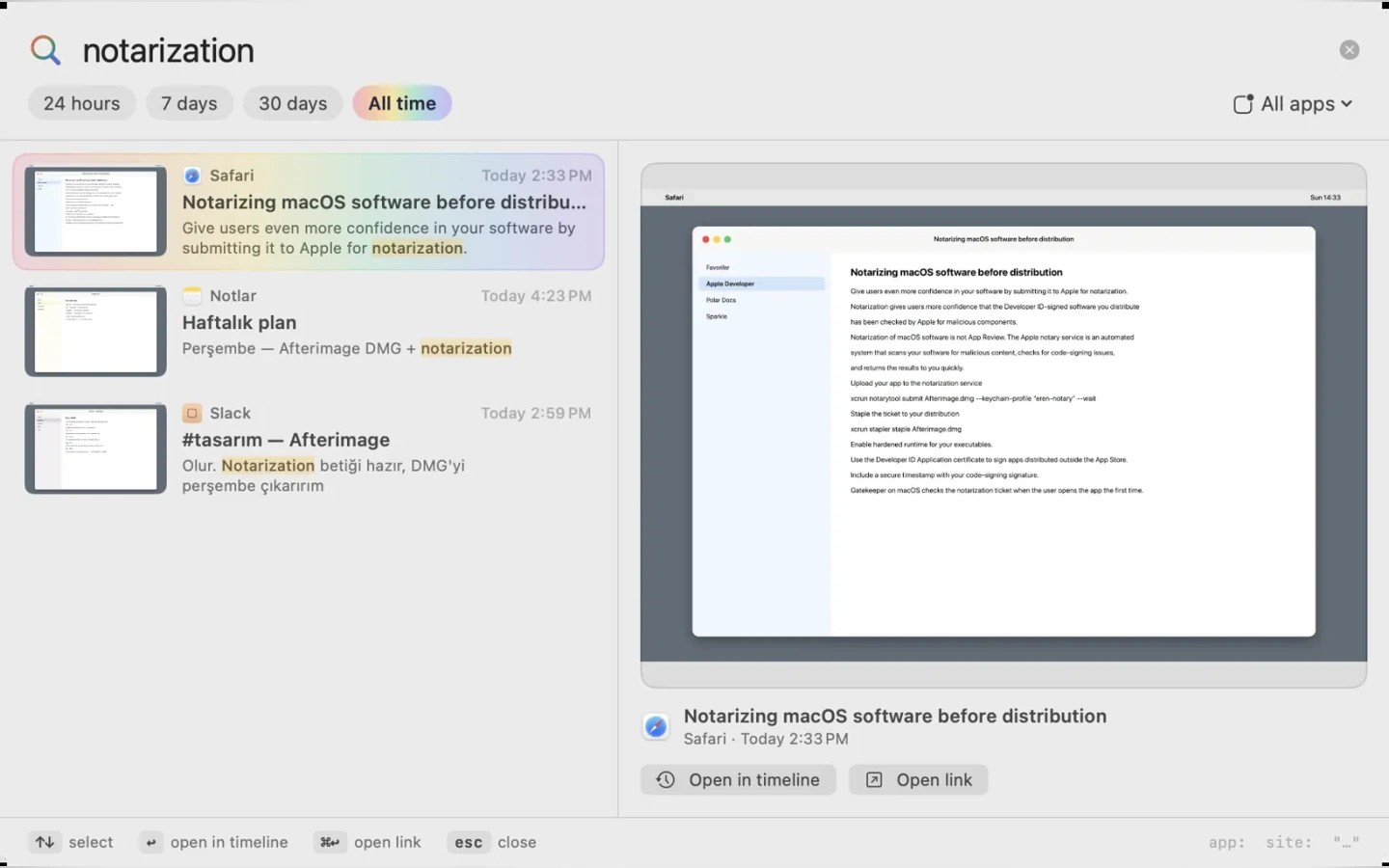
Afterimage keeps a searchable history of what appeared on your Mac’s screen. Press Shift–Command–Space from any app to search for a word, ID, link or message. A visual timeline lets you revisit the moment as it appeared on screen.
A journal shows which apps and projects your time went to. The app records only when the screen changes and saves heavy processing for when your Mac is plugged in. Storage is limited to 10 GB by default, with an adjustable limit in Settings.
Password fields, private browser windows and apps you exclude are not recorded. Screen Recording permission is required. Accessibility permission is recommended to read app text with less battery use and distinguish private browser windows.
Recording, text recognition, search and AI processing run locally. Screen images, text and activity are not sent elsewhere; network connections are limited to license validation and update checks. The Ask feature requires macOS 26 and Apple Intelligence. Without those requirements, the daily summary uses a template.
Tags
More in Productivity

Readability
Productivity
Magnet
Productivity