
Lingon
Lingon schedules apps, scripts, shortcuts, and commands at set times, on intervals, or at login. Tasks can also run from the menu bar, Siri, or a hot key, with optional notifications when they run.
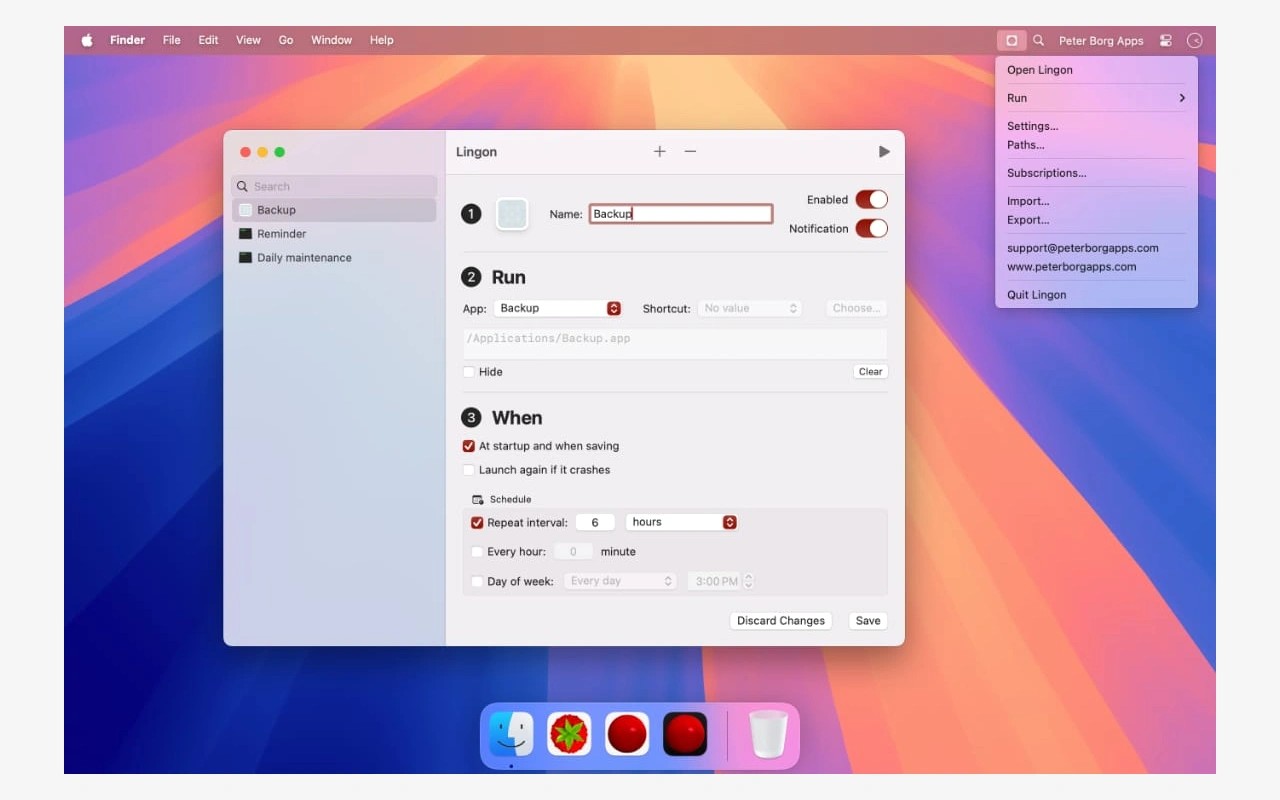
Lingon automates tasks by launching apps, scripts, shortcuts, and commands on a schedule. You create a named task, choose what it should run, and set a time, repeat interval, or login trigger through a graphical interface.
The app lives in the menu bar, where you can open its main window or run tasks manually. You can also trigger tasks through Siri and Shortcuts. Assigning a task a hot key lets you run it from another app; task hot keys require macOS 15 Sequoia or later. Optional notifications let you know when a task runs.
Lingon must stay running for its tasks to run, though you can close the main window. If your Mac is asleep at a scheduled time, that run is skipped and the task waits until its next scheduled time. Scripts and shortcuts may need additional file-access permissions, which you can grant for specific paths or through Full Disk Access.
Tasks can be exported and imported to move them to another Mac. Lingon can also import launchd task files, but it does not support every launchd feature. Running tasks as root and fully editing launchd settings require the separate Lingon Pro app.
Tags
More in Utilities

Aion
Utilities
Haptiker
Utilities