
Sandkorn
Sandkorn shows which Mac apps are sandboxed and which security entitlements they use. Browse by app or entitlement, and inspect details for apps and their bundled executables without changing them.
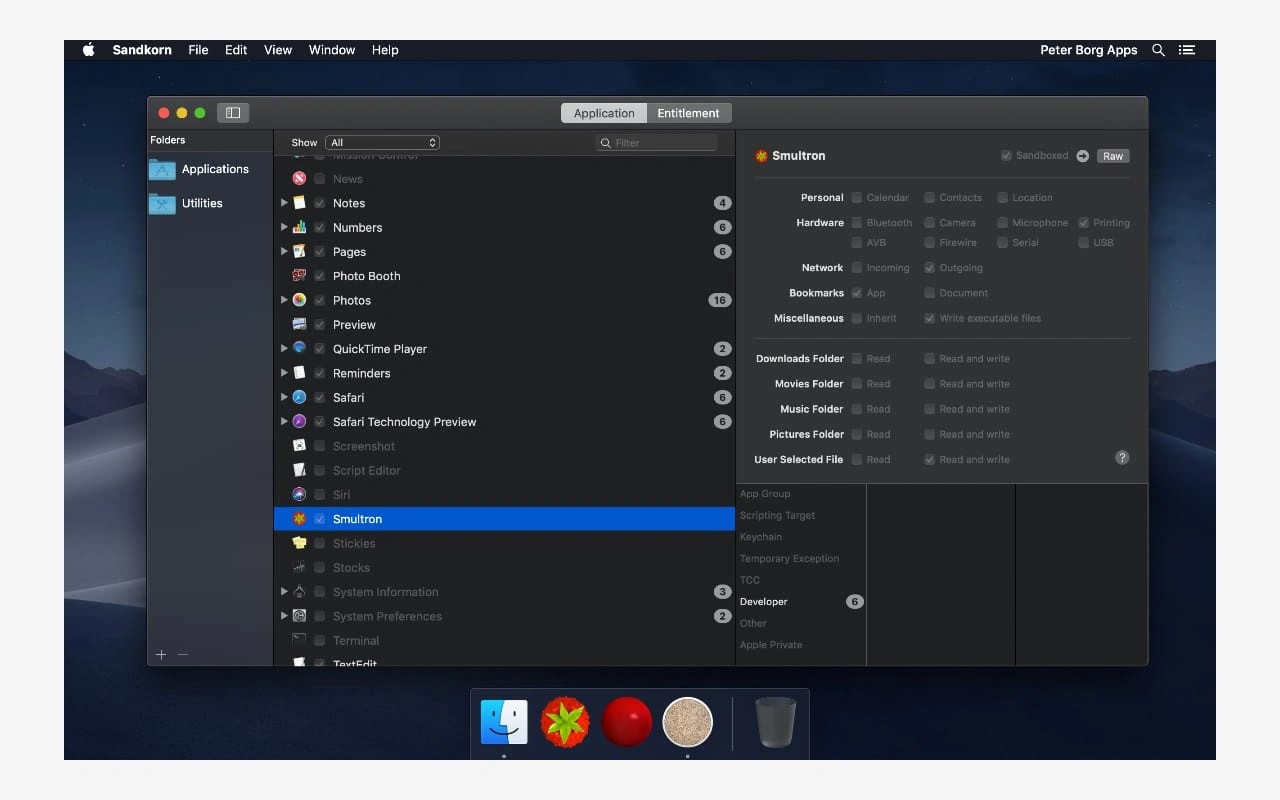
Sandkorn inspects Mac apps to show whether they are sandboxed and which security entitlements they use. These entitlements describe capabilities such as network or camera access. You can browse individual apps or switch to an entitlement-based view to find apps associated with a particular capability. Sandkorn displays this information but cannot change entitlements.
It checks the Applications and Utilities folders by default. You can add other folders, but it does not scan their subfolders automatically; each subfolder must be added separately. Within app bundles, it also looks for executables such as helpers, plug-ins, and XPC services, though this search is limited to specific bundle locations.
Filters let you narrow the results by sandbox status, folder, or entitlement group. Checkboxes and gray text distinguish an app’s own status from that of an executable inside it, so an app may appear under an entitlement even when only a bundled component has it.
Selecting an app reveals its entitlement details and values. Sandkorn uses readable names for some entitlements, with the original keys available through tooltips or a raw-key view. You can also inspect the raw entitlement property-list values. Results are cached between launches, and a manual refresh clears the cache and updates the information.
Tags
More in Utilities

KarmaDisk
Utilities
IsThereNet
Utilities